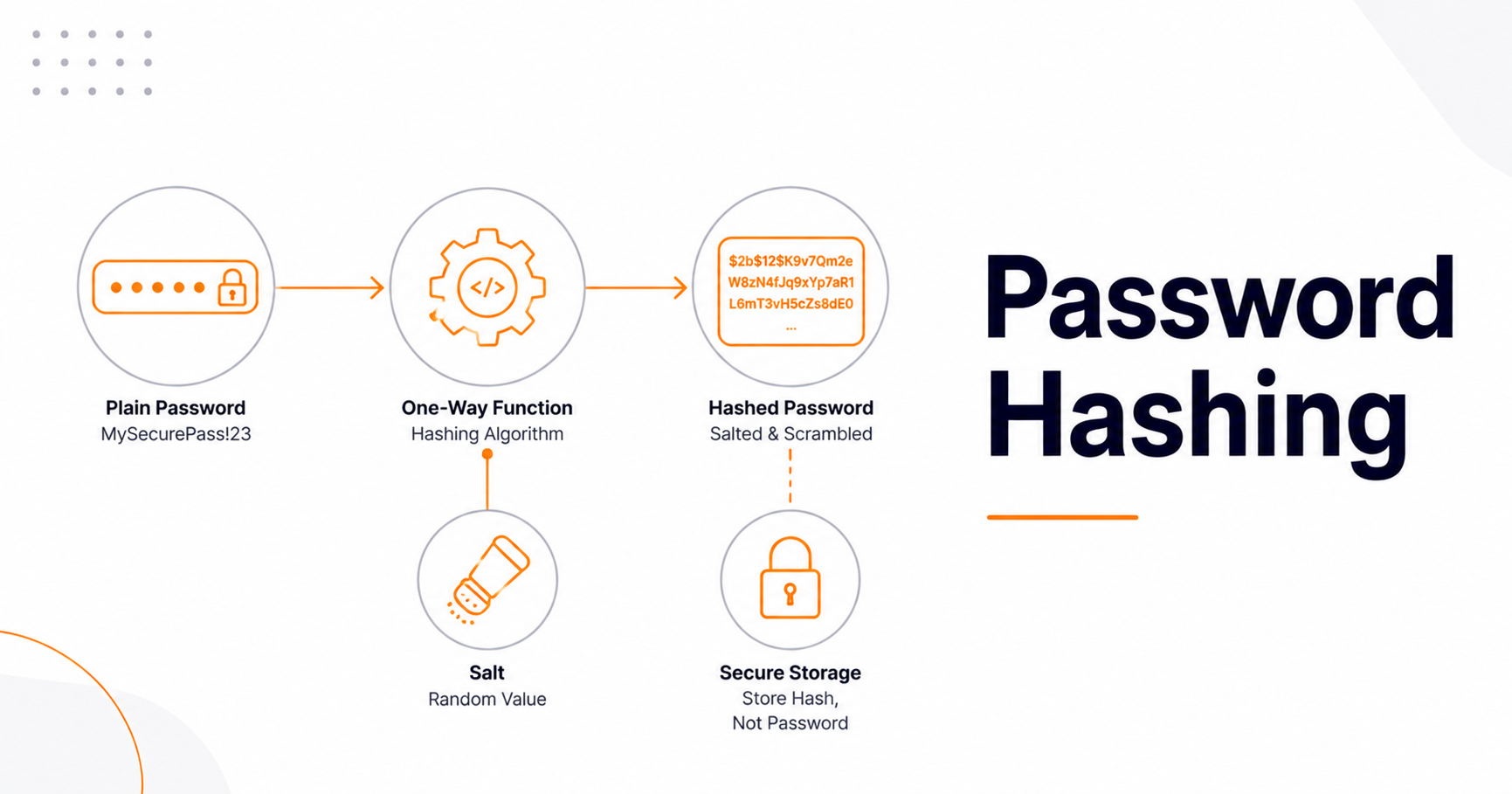
Password Hashing Explained: How Sites Store Your Password Safely

Password hashing is the process of converting a password into a fixed, scrambled string using a one-way function, so a website can verify your login without ever storing your actual password. Unlike encryption, hashing can't be reversed—there's no key to turn the hash back into the original. That's the whole point: even if a site's database is stolen, well-hashed passwords are extremely hard to recover. The catch is that how you hash matters enormously, and getting it wrong is the same as storing passwords in plain text.
This guide explains how hashing works, why fast algorithms like MD5 and SHA-256 are the wrong choice for passwords, what salting and memory-hardness mean, and which algorithm to actually use in 2026. It's written for developers and the security-curious alike.
Hashing vs. encryption (they're not the same)
People mix these up constantly. Encryption is two-way: data is scrambled with a key and can be unscrambled with that key. Hashing is one-way: it transforms input into a fixed-length output that cannot be reversed back into the original. When you log in, the server hashes the password you typed and compares it to the stored hash—if they match, you're in. The server never needs (or keeps) your real password. You can watch a hash get generated with our MD5 Generator—just don't use MD5 for real passwords, for reasons we'll get to.
Two details make that one-way trick work. First, the output is always the same size. A four-letter password and a four-page passphrase both produce a string of the same length, so the hash leaks nothing about how long your password was. Second, tiny changes to the input scramble the whole output. Change one letter and the result looks completely unrelated. So you cannot nudge your way toward the answer by guessing "close" passwords and watching the hash drift. You either hit the exact input or you learn nothing.
Why you can't just store passwords
If a site stores passwords as plain text and gets breached, every account is instantly compromised—and because people reuse passwords, the damage spreads to other services through credential-stuffing attacks. Hashing is the defense: store the hash, not the password. But not all hashing is equal, and this is where most mistakes happen.
It helps to think in terms of blast radius. A leaked table of plain-text passwords hands an attacker your users, plus their bank, their mail, and their work login. A leaked table of slow, salted hashes hands the attacker a pile of expensive math. Same breach, wildly different Monday morning. That gap is the entire value of the work described in the rest of this guide.
How password hashing works during a login, step by step
A login is a short loop. The browser sends the password over an HTTPS connection. The server looks up the stored hash for that account. It runs the same password hashing function again, using the salt and the settings baked into that stored value. Then it compares the two results. If they match, the server opens a session and drops the password from memory.
The stored value is doing more work than it looks like. A modern hash string carries the algorithm name, the cost settings, the salt, and the final digest, all in one field. That is why verification works without a separate salt column, and it is also why you can raise your cost settings later without breaking old accounts. Every hash describes how to check itself.
Step four, the comparison, deserves more care than most people give it. A plain equality check stops at the first byte that differs. That means the check takes slightly longer when more of the front of the value matches. Where that really bites is comparing tokens and API signatures, because there the attacker supplies the value being tested and can walk it forward one byte at a time. A password login is a much harder target, since the value being compared is the output of a slow one-way function the attacker cannot steer. Use the constant-time comparison your library provides anyway. Most password-verify functions already do it for you, and if you are comparing hashes by hand, the fix costs you one function call.
Timing matters in one more place. If your login answers "no such user" instantly and "wrong password" after a slow hash, you have handed attackers a free account-lookup service. They can farm valid email addresses without ever guessing a password. The standard fix is to run a dummy hash for unknown accounts so both paths take roughly the same time, and to return the same generic message either way.
Why fast hashes (MD5, SHA-256) are wrong for passwords
Here's the counterintuitive part: for passwords, speed is bad. Algorithms like MD5, SHA-1, and SHA-256 were designed to be fast—great for verifying file integrity, terrible for passwords. A modern GPU can compute on the order of 10–22 billion SHA-256 hashes per second, which means an attacker who steals a SHA-256 database can test an entire common-password wordlist almost instantly. If you're hashing passwords with MD5 or SHA-256, your users' passwords are effectively stored in plain text. The fix is an algorithm that's deliberately slow.
The three properties a password hash needs
A proper password hashing function has three traits that general-purpose hashes lack:
- Deliberate slowness. A tunable "work factor" makes each hash take a meaningful fraction of a second—negligible for one login, but crippling for an attacker trying billions of guesses.
- Per-record salt. A unique random value added to each password before hashing, so two users with the same password get different hashes. Salt defeats precomputed "rainbow table" attacks and stops attackers from cracking many accounts at once.
- Memory-hardness. The best modern algorithms also demand significant memory per hash, which neutralizes the parallel-cracking advantage of GPUs and specialized hardware.
Note what salt does and doesn't do: it prevents rainbow tables and identical hashes, but it doesn't slow down a brute-force attack—only a deliberately slow algorithm does that. The two work together.
A note on salt and pepper
Modern algorithms generate and embed the salt automatically inside the hash output, so you don't store it separately. Some systems add a pepper—a secret value kept outside the database (in an environment variable or secrets manager)—as an extra layer, so a leaked database alone isn't enough to start cracking. Salt is per-user and stored with the hash, and pepper is global and kept secret.
A pepper only helps while it stays secret and separate. If it sits in the same repository as your database credentials, or in a config file that ships with a backup, it buys you nothing. Treat it as an optional bonus layer, never as a substitute for a slow algorithm.
Which algorithm to use in 2026
Four algorithms dominate the conversation. Here's the practical guidance, aligned with the OWASP Password Storage Cheat Sheet:
- Argon2id — the default choice for new projects. Argon2 won the Password Hashing Competition, and Argon2id is the variant specified in RFC 9106 as the default choice. It is both memory-hard and GPU-resistant. OWASP's baseline parameters are roughly m = 19 MiB, t = 2, p = 1 (tune upward to your hardware).
- bcrypt — still cryptographically sound at a cost factor of 12 or higher, and fine to keep on existing systems. Its limitations are a 72-byte input cap and a fixed, smaller memory footprint that makes it less GPU-resistant than Argon2.
- scrypt — memory-hard and solid, but largely superseded by Argon2 for new work.
- PBKDF2-SHA256 — the FIPS-compliant option when regulations require it, at a minimum of around 600,000 iterations.
The one rule everyone agrees on: never use MD5, SHA-1, or plain SHA-256/512 for passwords.
One practical note before you start wiring parameters by hand. Nearly every mainstream language and framework now ships a password module that picks a sane algorithm, generates the salt, and formats the stored string for you. Use it. The hand-rolled version of this code is where the bugs live, and there is no prize for building your own. Reach for the raw primitives only when you have a real reason and someone to review the result.
If you're building on WordPress and want to see how a platform generates a stored password hash, our WordPress Password Hash Generator demonstrates the format WordPress uses.
How do you pick a work factor for password hashing?
Start from a target: how long should one login take on your own servers? Then raise the cost setting until a single hash lands near that target on production hardware. There is no universal number to copy. The right value depends on your CPUs, your memory headroom, and your traffic at peak. Benchmark it yourself, and write the result down.
Your laptop is a bad test bench. Developer machines are often faster per core than the shared instances that actually serve your traffic, so a setting that feels fine locally can crawl in production. Measure where the code will run. Then measure again with realistic concurrency, because memory-hard algorithms scale in a way that surprises people. Each login in flight holds its own memory allocation. Multiply your memory setting by the number of logins you expect at the same second, and you have your real budget. Miss that and a Monday morning login rush will exhaust the box.
This is also why an expensive hash is a resource you have to defend. If anyone can hit your login endpoint a thousand times a second, they can burn your CPU without guessing a single password. Rate limiting is not optional once your hashing gets slow. Cap the accepted password length too, so nobody submits a megabyte of text and makes you hash it.
Finally, treat the setting as perishable. Hardware gets faster every year, so a cost factor you chose once quietly gets weaker while you sleep. Put a calendar reminder on it, re-benchmark, and raise the value. Because the parameters live inside each stored hash, old accounts keep verifying and upgrade on their next login. And to head off the obvious temptation: do not lower your work factor to make a sluggish sign-in page feel quicker. Login cost is server work, not the front-end rendering work we cover in our Core Web Vitals guide, and a session cookie means each user pays that cost once, not on every page.
What goes wrong with password hashing in the real world
Most failures are not broken math. They are ordinary engineering slips around a sound algorithm. A team invents its own scheme, or trims the input, or writes the raw password into a log file that ships to a third-party service. The algorithm is fine in every one of those cases. The system is not. Here are the patterns worth checking for in your own code.
- Rolling your own. Chaining a fast hash with some clever twist feels smart and buys nothing. Nobody outside your team has ever tried to break it.
- Double hashing. Feeding one hash into another does not add real strength, and it can quietly reduce the input space you started with.
- Silent truncation. A form that cuts input at a fixed length, or a database column too short to hold the full hash string, throws away security without a single error message.
- A global salt. One shared random value stored beside the hashes is not a salt. Identical passwords still produce identical hashes, and rainbow tables come back into play.
- Logging the plaintext. Debug logs, crash reports, and request dumps all love to capture the whole form body. Filter password fields before anything is written.
- Hashing in the browser. If the client sends a hash, that hash is the password. Stealing the database still lets an attacker log in directly. Hash on the server.
- A plain equality check. Use the constant-time comparison your library provides rather than the standard operator.
- A weak reset flow. A reset link that never expires, or a token generated from a predictable value, walks straight around your careful hashing.
Sites that grow fast tend to accumulate these. If you collect reviews, comments, or community discussion of the kind covered in our guide to user-generated content strategy, you are almost certainly storing accounts too, and that means you own this problem. The audit is cheap. Grep your codebase for the password field name, read every place it appears, and confirm it reaches exactly one function.
Why password hashing is not the whole story
Hashing protects passwords after a breach. It does nothing against an attacker who already has the correct password. Credential stuffing works precisely because somebody else lost that password, on some other site, years ago. So treat strong hashing as one layer. Rate limits, multi-factor sign-in, and breach screening cover the attacks that hashing was never designed to stop.
Rate limiting comes first because it is the cheapest. Slow down repeated failures per account and per source address, add a growing delay, and watch for the spray pattern where one common password is tried against thousands of accounts in turn. Multi-factor sign-in comes next. An app-based code or a hardware key means a stolen password alone is not enough. Passkeys go further still, because the server stores only a public key and there is no shared secret left to hash or leak.
Breach screening is the layer teams skip. When a user picks a new password, you can check it against public lists of leaked passwords without ever sending the whole thing. The usual method sends only a short prefix of the password's hash, gets back a batch of candidates, and does the final match locally. Reject anything on the list at signup and at password change. That single check removes the passwords attackers try first.
There is a business angle here too. A compromised site rarely stays a private engineering problem. Injected spam and malware get sites flagged by browsers and search engines, and recovery is slow and public, as our post on how to check and fix a blacklisted site lays out. Security is part of the trust picture we describe in our guide to building E-E-A-T and trust. Nobody links to a site their browser warns them about.
Migrating without forcing a password reset
If you're on a weak algorithm, you don't have to reset everyone's password. The standard approach is to rehash on login: when a user authenticates successfully, check whether their stored hash uses an outdated algorithm or cost factor, and if so, re-hash the password they just supplied with the stronger settings. Over time, active accounts upgrade transparently. Prioritize by urgency—plain text, MD5, and SHA-1 demand immediate migration, and weak SHA-256 or low-iteration PBKDF2 should be addressed soon. The switch is entirely server-side and invisible to users, who simply keep logging in over HTTPS as normal.
Plan for the accounts that never come back. Dormant users will still be sitting on old hashes a year later, so track how many remain and set a cutoff date. When that date arrives, expire the stragglers and send them through a normal reset. It is a small amount of support work, and it lets you finally delete the old code path.
What can you check from a site's outside?
Honestly, not much. Hashing happens on a server you will never see, and no browser tool can inspect it. What you can judge is the behavior around it. Does the site offer two-factor sign-in? Does it accept a long passphrase? Does the reset flow send a link rather than your old password? Those answers are visible, and they tell you something real.
Three signs deserve a hard look. A site that emails you your existing password has proven it can read that password, which means it is not hashing at all. A site that caps passwords at a short length, or strips out spaces and symbols, is hinting at an old storage design. And a site with no second factor on a valuable account is leaving you exposed to any password leak anywhere. None of those are proof of bad password hashing on their own, but together they paint a picture.
Public tools only see public pages, and it is worth being clear about that limit. Something like our meta tag analyzer reads the markup a page serves you, and our SEO report tool scores a single page. Both are useful. Neither can tell you a single thing about how that site stores passwords, and any tool claiming otherwise is guessing. So control the part you actually control.
What this means for you as a user
You can't control how a website hashes your password, but you can make hashing work in your favor: use a long, unique password for every account so that even if a site's hashed database leaks, yours is impractical to crack and useless elsewhere. That's exactly the approach in our guide to creating a strong password—generate long random passwords with our Password Generator and test them with the Password Strength Checker.
Length beats cleverness here, and the reason is mechanical. Every extra character multiplies the number of guesses an attacker has to make, while swapping a letter for a lookalike symbol barely moves the number at all. Cracking tools already know those swaps. Pair long passwords with a manager so you never reuse one, turn on a second factor everywhere it is offered, and you have done the part of this job that belongs to you.
Frequently asked questions
Is hashing the same as encryption?
No. Encryption is two-way and uses a key, so the original data can be recovered. Hashing is one-way and has no key. A server can check a password against a hash, but it cannot turn that hash back into the password.
Why is MD5 bad for passwords?
MD5 was built to be fast, and speed helps the attacker. A stolen MD5 database lets someone test enormous wordlists in very little time. Password storage needs a deliberately slow algorithm instead, so each guess costs real work.
What is a salt, and why does it matter?
A salt is a unique random value mixed into each password before hashing. It makes two identical passwords produce different hashes, and it defeats precomputed rainbow tables. Salt does not slow an attacker down on its own. The slow algorithm does that part.
Which password hashing algorithm should I use in 2026?
Argon2id for new projects. It is memory-hard, GPU-resistant, and specified in RFC 9106. bcrypt at a cost factor of 12 or higher remains sound on existing systems. Choose PBKDF2-SHA256 when a regulation demands a FIPS-compliant option.
Can a hashed password be reversed?
Not directly. There is no key and no undo. What an attacker can do is guess passwords, hash each guess, and look for a match. That is why a slow, salted, memory-hard algorithm matters so much.
Is bcrypt still safe to use?
Yes, at a cost factor of 12 or higher. It is fine to keep on an existing system. Its input cap of 72 bytes and its small fixed memory use make it less GPU-resistant than Argon2id, so prefer Argon2id for anything new.
What is a pepper, and do I need one?
A pepper is a global secret stored outside the database, so a leaked database alone is not enough to start cracking. It is a useful extra layer, not a requirement. It only helps if it is genuinely kept apart from the data.
Should I hash the password in the browser?
No. If the browser sends a hash, that hash becomes the real credential, and stealing the database is enough to log in. Send the password over HTTPS and hash it on the server. Client-side hashing can be added on top, never instead.
How do I upgrade old hashes without resetting passwords?
Rehash on login. When someone signs in successfully, check whether their stored hash uses an old algorithm or a low cost factor. If it does, hash the password they just supplied with your current settings and save that. Active accounts upgrade silently.
Does strong hashing stop credential stuffing?
No, and that surprises people. Stuffing uses passwords that are already correct, leaked from some other site. Hashing never sees a wrong guess. Rate limits, multi-factor sign-in, and breach-password screening are what block those attacks.
Final thoughts
Password hashing is a small piece of code with outsized consequences. Done right—a slow, salted, memory-hard algorithm like Argon2id—it means a stolen database is a headache rather than a catastrophe. Done wrong, with a fast hash like MD5, it offers almost no protection at all. Whether you build systems or just use them, the principle is the same: strong hashing on the server and strong, unique passwords on your side are what keep a breach from becoming a disaster.
If you want one action from this guide, make it this. Open your login code today, find the function that handles the password, and confirm it is a modern algorithm with a cost factor you have actually measured. That check takes an afternoon. For more technical explainers like this one, including a plain-English breakdown of how RAG architecture works in enterprise AI systems, browse the rest of our blog.