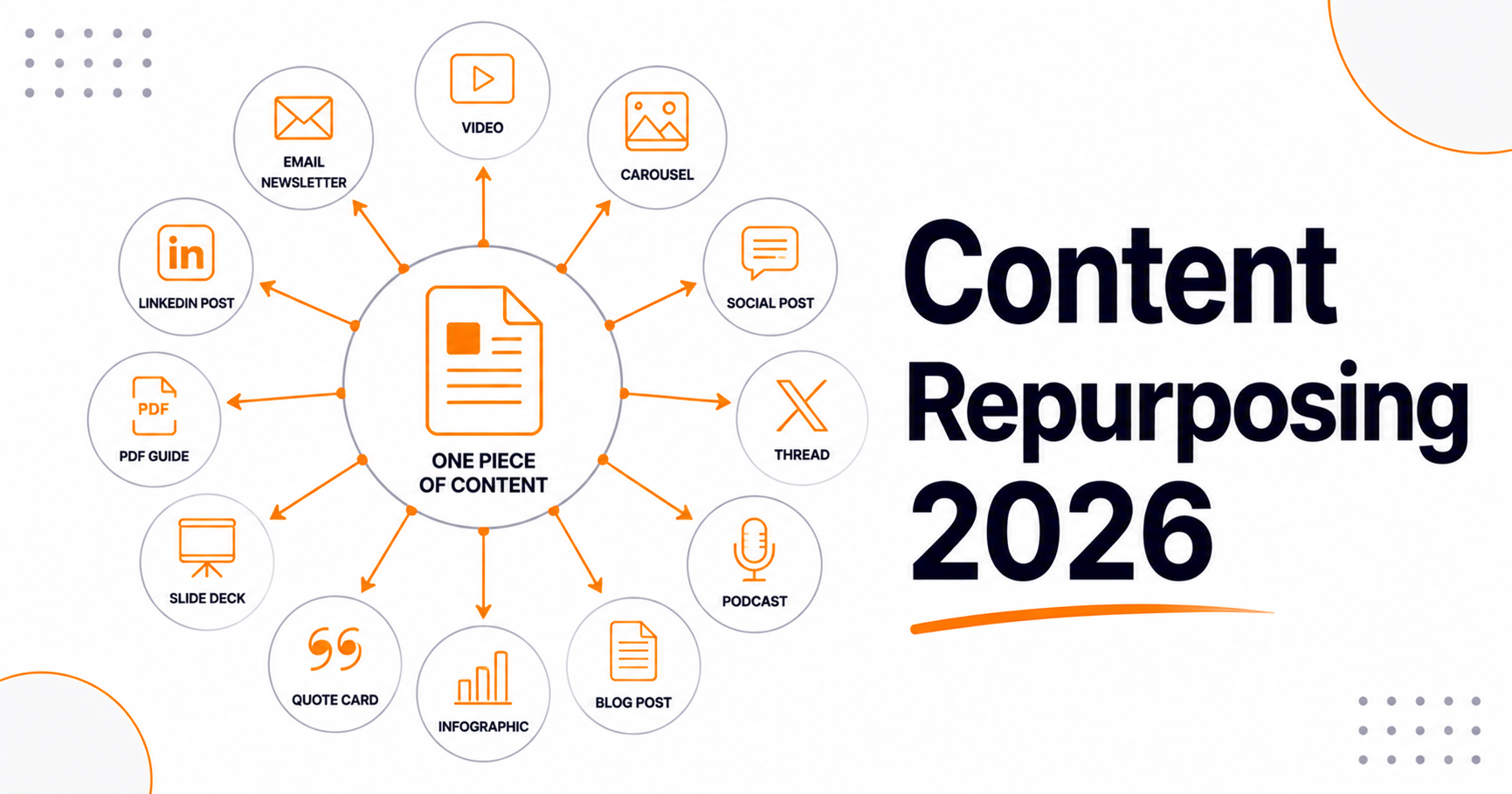
Content Repurposing: One Article, 12 Pieces

Content Repurposing: How to Turn One Article Into 12 Pieces of Content in 2026
Most content marketing operations share the same expensive habit. They pour hours into researching, writing, and publishing a strong article. Then they distribute it once, watch the traffic spike fade, and move on to the next post. The content sits there, aging quietly, until it eventually drops off the first page and disappears from view.
This is a significant waste. The research, the insight, and the data all hold value. That value reaches far beyond one blog post and a brief moment of visibility. An article distributed once reaches whoever happened to see it that day. The same research, repackaged for each channel your audience actually uses, keeps finding new readers long after that day.
Content repurposing is the practice of transforming one well-researched source piece into multiple formats optimized for different platforms and audiences. Done well, it turns your content operation from a production line into a compounding asset. Every strong article keeps earning reach, authority, and new readers across a dozen channels. That value builds for months after you hit publish.
This guide covers the complete content repurposing system for 2026. You will learn how to pick the content worth reusing, and how to pull the most formats out of each piece. It covers the tactics for each channel. It also covers the workflow that makes content repurposing a standard step rather than an afterthought.
Why Content Repurposing Is More Valuable in 2026 Than Ever Before
Three shifts in 2026 make systematic repurposing essential, not just efficient.
First, most of your audience sees only a small share of what you post on any platform. Feeds filter heavily, and attention is split across dozens of channels. A reader who follows you on LinkedIn might never visit your blog. A subscriber to your email list might not be active on YouTube. Repurposing the same core insight across many formats and channels raises your odds sharply. Your message reaches the people who actually need it.
Second, topical authority is built through broad, multi-format coverage of a subject. It is a key signal that Google and AI systems use to judge whether your content is helpful and credible. When your brand covers a topic in blog, video, newsletter, social, and community form, that presence signals real expertise. Single-format coverage signals one moment of effort. Multi-format presence signals sustained commitment.
Third, repurposed content strengthens your AI citation signals. AI retrieval systems do not only index your blog — they index YouTube captions, LinkedIn articles, Reddit discussions, podcast transcripts, and more. A brand that covers a topic across many formats shows up in more AI retrieval contexts. That makes it more likely to be cited for a wider range of related queries.
Step 1: Identify Content Worth Repurposing
Not every piece of content deserves the full repurposing treatment. Prioritize based on three criteria:
Evergreen Topics
The best material answers questions people ask this year and will still ask next year. "How to build a content cluster," "what is keyword density," "how to write a meta description" — these topics do not expire. Content repurposing on evergreen topics compounds. Each format adds lasting distribution value rather than a short spike.
Avoid time-sensitive content such as news posts, trend reactions, and event recaps. The return falls sharply once the moment passes.
High-Performing Existing Content
Before creating new repurposing source material, audit your existing content library. Identify your top 10 articles by organic traffic, engagement rate, and conversion. These posts have already proven their audience appeal — repurposing them multiplies value from a validated asset rather than gambling on an untested one.
Use our free Website SEO Score Checker to see which of your pages have the strongest technical foundation. Those pages are your safest bets.
Content That Answers Common Questions
Articles built around the explicit questions your audience asks repurpose very well. The question-and-answer format maps straight onto social posts, email subject lines, video scripts, and FAQ sections. Check Search Console for the queries driving traffic to each article. Prioritize the ones that answer several distinct questions.
Step 2: Extract Your Core Assets Before Writing Derivative Formats
Before you start creating derivative formats, spend 30 minutes pulling the most reusable parts out of the source article. This becomes your raw material inventory for content repurposing.
- Quotable statements — short, declarative lines that carry a key insight on their own. One example: "Most content never reaches the people it was written for, not because it is bad, but because distribution ends too soon."
- Data points and statistics — specific numbers with sources that can anchor a social post, email subject line, or video hook.
- List items — numbered lists and bullet points from the article that translate directly into carousel slides, thread posts, or email sections.
- Step-by-step processes — any how-to sequence becomes a natural video script, carousel, or email sequence.
- The central argument or counter-intuitive claim — the core "big idea" of the article, which becomes the hook for every short-form derivative.
- FAQ pairs — every Q&A pair in the article's FAQ section is a standalone social post or email newsletter section.
With these assets pulled out, each new format becomes packaging rather than fresh writing. That cuts the time cost of content repurposing sharply.
The 12 Repurposing Formats: A Complete Platform-by-Platform Breakdown
Format 1: LinkedIn Native Article
Rewrite the blog post's introduction and conclusion for a professional B2B audience. Focus on the business implications and professional growth angle of the core insight. Posts that push readers off LinkedIn reliably underperform native ones, so a condensed native version usually travels further than a bare link to your blog. Publish the adapted version on LinkedIn and keep the blog link in the comments or the closing line.
Format 2: Twitter/X Thread
Take the article's numbered list or step-by-step process and expand each item into a tweet. Structure: Tweet 1 = the bold central claim or counter-intuitive statistic (the hook). Tweets 2–8 = one key insight per tweet, each self-contained. Final tweet = a summary and a link to the full article for readers who want depth. Threads generally out-reach a single link tweet on X, because each additional post gives the algorithm another chance to surface the sequence.
Format 3: LinkedIn Carousel Post
Transform the article's list, framework, or step-by-step process into a 10–12 slide carousel. One idea per slide, with a bold headline and 1–2 supporting sentences. Carousels are among LinkedIn's highest-engagement formats because they need active interaction. Users have to swipe, and that signals engagement to the algorithm. End with a clear CTA slide directing readers to the full article.
Format 4: Short-Form Video Script (Reels / TikTok / YouTube Shorts)
Every article holds at least one insight that works as a short video of 45 to 90 seconds. One formula performs consistently. Hook the viewer in the first 2 seconds with a bold claim or a surprising number. Deliver two or three supporting points quickly, then close with a clear call to action. One blog post should generate 3–5 short-form video scripts, each focused on a single insight from the article. You do not need a studio. On most short-form platforms, direct-to-camera delivery holds attention better than polished production values.
Format 5: Email Newsletter Section
The email newsletter is your highest-value owned distribution channel. Turn the article's core insight into a standalone newsletter section. Use one strong subject line and one paragraph on why it matters to your subscriber. Add three to five bullet takeaways, then link to the full article. Keep the email section self-contained — subscribers should get value from reading it even if they never click through.
Format 6: Email Sequence (Multi-Part)
For long pillar articles with a multi-step process, turn each section into one email in a drip sequence. A 7-step framework becomes a 7-day email series. Each email covers one step in depth, with a preview of what is coming next. This format works well for onboarding and for educational lead nurture. It also brings readers back to your site again and again.
Format 7: Reddit or Forum Post
Community platforms such as Reddit, niche forums, and Q&A sites matter more every year. They feed both organic reach and AI citation signals. AI systems lean on community discussions when they answer experiential and comparison queries. Post a genuine contribution rather than a link dump. Answer a real community question in full, and cite your article only where it actually helps.
Format 8: YouTube Long-Form Video
A comprehensive pillar page or in-depth cluster article contains enough material for a 10–20 minute YouTube video. Write the article as a spoken script, then record and edit it. A talking-head format with screen sharing works well for tutorials. Upload it with a full description that includes your target keywords, chapter timestamps, and a link back to the article. YouTube is a search engine in its own right, not just a video host. Most blog-focused teams under-invest in it.
Format 9: Podcast Episode Outline
If you host a podcast, or know hosts in your niche, your article is a ready-made episode outline. Each section heading becomes a conversation segment. The article's data points become discussion anchors. The FAQ section becomes a listener Q&A segment. Podcasts build a bond with listeners that written content cannot match. Those listeners convert well when they finally visit a resource you recommend.
Format 10: Infographic or Visual Data Asset
An infographic turns the article's structure into a single image people can scan in ten seconds. It is the one format that travels without you. Pinterest saves it, bloggers embed it, and Slack users paste it into team channels with no context at all.
Derive it from the parts of the source article that already have shape. Any numbered list, comparison, or before-and-after in the original body is a candidate. If the article explains a process, the infographic is that process as a vertical flow. If it compares options, the infographic is a side-by-side grid. Pull the three or four hardest numbers in the piece and give each one its own visual block. Compress the finished file before you publish it, because a heavy image undercuts the page it sits on. Our image optimization guide covers the settings that matter.
Here is the practitioner tip that matters most. Put the article URL in the footer of the image itself, in readable type, not tiny gray text. People screenshot infographics and strip the caption. The URL baked into the pixels is the only attribution that survives that trip.
This format is good for link acquisition and for topics where the reader needs to see relationships rather than read about them. It underperforms for nuanced arguments. If your article's value is judgment rather than structure, skip it.
Format 11: Lead Magnet Checklist, Template, or Worksheet
A lead magnet turns the article's advice into something the reader can use at their desk. The article explains what to do. The lead magnet is the thing they open while doing it. That difference is why people trade an email address for it.
The extraction is simple. Read your own article and mark every sentence that starts with a verb. Those imperatives are your checklist items. A quick pass through our word counter tells you whether the result is a one-page asset or a document nobody finishes. If the article describes a framework with named stages, build a worksheet with one section per stage and blank space under each. If it recommends a repeatable calculation or audit, that becomes a fillable template.
The mistake I see most often is over-designing this asset. Teams spend two weeks on a branded PDF nobody prints. A clean one-page checklist built in a spreadsheet or a shared doc converts about as well and takes an afternoon. Ship the plain version, then upgrade it only if the download numbers justify the design time.
This format is good for email list growth and for turning a traffic page into a pipeline page. It also gives every other derivative a destination, since your thread, video, and newsletter can all point to the same download.
Format 12: Slide Deck for a Webinar or Conference Talk
A slide deck is the most useful format on this list, and the most ignored. One article becomes a thirty-minute talk. That talk then becomes a webinar, a conference submission, a sales enablement deck, and an internal training session. Each of those has a longer shelf life than any social post.
Build it from the article's H2s. Each major section becomes one anchor slide with a claim on it, followed by two or three support slides. Your opening hook becomes slide one. Your conclusion becomes the closing ask. Speaker notes are close to free, because the article's prose already is the script.
One tip that changes how the deck performs. Cut your slide count roughly in half after the first draft, then move the deleted material into the notes. A deck with too many words on screen reads as a document and dies in a live room. Sparse slides with dense notes work in both settings.
This format is strongest for B2B topics, technical subjects, and anything you want to pitch to an industry event. Conference organizers in the US and Europe open their calls for speakers months ahead, and a finished deck makes that submission a fifteen-minute job.
Building a Repeatable Repurposing Workflow
Content repurposing fails for one reason. Teams treat it as a project instead of a step. Projects get postponed. Steps get done because the process stalls without them. The fix is to attach repurposing to the publishing checklist you already run, so nobody has to decide to do it.
Start by naming an owner per article, not per format. One person owns the derivatives from a given piece and decides which of the twelve formats apply. Trying to assign each channel to a different specialist creates handoffs, and handoffs are where this work dies. The owner can delegate execution, but the accountability stays in one place.
Then split the work across a few fixed moments rather than one heroic afternoon.
On publish day, produce only what is fast and native to the article. That usually means the social thread, the newsletter section, and one short-form video script. Two hours, no design dependencies, no approvals. In week one, add the formats that need a little production. That is the carousel, the infographic, and the lead magnet. In week four, look at the data before doing anything else. Whichever derivative earned real engagement tells you where the long-form investment belongs, whether that is a video, a podcast segment, or a deck.
The recurring steps look like this.
- Publish day: assign the owner, pick the target formats, ship the three fast ones.
- Week one: produce the two or three formats that need design or writing time.
- Week two: schedule the second wave of social posts, since most channels reward repetition more than teams expect.
- Week four: review the numbers, then commit to one heavy format or drop the article.
- Quarterly: re-run the whole cycle on your top three performing articles from the previous quarter.
Protect the workflow from busy weeks with a hard rule. If the team cannot complete the publish-day derivatives, the article does not publish that day. That sounds severe. In practice it stops the slow drift where the blog keeps shipping and the distribution quietly stops. An article that publishes a week later with full distribution beats one that publishes on time and reaches nobody.
Track it somewhere visible. A simple board works. Use one row per article and one column per format. The gaps become obvious to everyone, including the people who approve headcount.
Final Thoughts: Distribution Deserves the Same Discipline as Production
Most content teams stop at the moment their work becomes valuable. The article goes live, it gets one social post and one newsletter mention, and then everyone moves to the next brief. All the effort sits in production and almost none sits in distribution. That imbalance, more than any ranking factor, explains why good content underperforms.
The twelve formats in this guide are not twelve extra jobs. They are twelve ways of asking the same question. Who else needed this, and where were they instead of your blog? A thread reaches the person scrolling between meetings. A checklist reaches the person doing the work. A deck reaches a room of two hundred people who have never heard of you.
None of this depends on talent or on a bigger team. It depends on making content repurposing part of your wider content marketing strategy rather than a nice idea that survives only in quiet weeks. Systematic beats heroic every time.
Your next action is small and specific. Open your analytics and find the one article from the last twelve months with the most organic traffic. If you are not sure which page is strongest, run the site through our website SEO score checker first. Then build three derivatives from that article this week. Use the publish-day set, since it needs no design help. If those three move anything at all, you have your case for making the workflow permanent.
Frequently Asked Questions
How long does it take to repurpose one article into multiple formats?
Plan on two to three hours for the fast set of a social thread, a newsletter section, and a short-form video script. The production-heavy formats such as an infographic, a carousel, or a lead magnet add two to four hours each, mostly in design. A full twelve-format run spread across four weeks typically costs a team two to three working days in total. That is still less than researching and writing a second article from scratch.
Does repurposing content cause duplicate content penalties?
No. Google has no duplicate content penalty for republishing your own ideas across social platforms, email, video, or slides. Those channels are not competing for the same search results as your article. The one case that needs care is republishing the full text on another indexable site, such as a syndication partner. There, add a canonical tag in the syndicated page's head pointing back to your original, or publish a shortened version instead. Our meta tag generator covers the basics for that page — title, description, robots, and language — but the canonical line you will need to add by hand.
Which repurposing formats should I prioritize with limited time?
Prioritize the formats that match where your audience already spends time, not the ones that feel most impressive. For B2B, that is usually the social thread, the email newsletter section, and the lead magnet, in that order. For consumer topics, short-form video comes first. Pick three formats, run them on every article for a quarter, and let the engagement data decide what you add next.
How often should I repurpose the same article?
Return to a strong article every quarter for as long as it keeps earning traffic. Most teams repurpose once and stop, which wastes the asset. Social feeds turn over fast, and the audience that saw your post in March is largely a different audience in June. Refresh the underlying facts first, then produce new derivatives rather than reposting the old ones word for word.
Should I use AI tools to handle content repurposing?
Use AI for the mechanical parts of content repurposing and keep a human on the judgment parts. AI is genuinely good at pulling out quotes, drafting a thread skeleton, and producing first-pass video scripts from your own text. It is weak at knowing which idea deserves the spotlight and at matching a platform's tone. The workflow that holds up is AI drafts, human edits, human decides what ships.
How do I measure whether repurposing actually worked?
Measure two things separately. First, channel-level engagement such as saves, comments, and watch time, which tells you whether the format landed. Second, downstream action such as email signups, referral traffic to the article, and assisted conversions. Ignore raw impressions. A thread with modest reach that drove forty checklist downloads beats one with high reach and no action behind it.